Application Level Protocol Filters:
1. HTTP
| Filter | Description |
|---|---|
http |
Show all HTTP packets |
http.response.code == 200 |
Show all packets with HTTP response code "200" |
http.request.method == "GET" |
Show all HTTP GET requests |
http.request.method == "POST" |
Show all HTTP POST requests |
HTTP Filters:
Following attacks could be detected with the help of HTTP analysis:
- Phishing pages
- Web attacks
- Data exfiltration
- Command and control traffic (C2)
HTTP analysis in a nutshell:
| Notes | Wireshark Filter |
|---|---|
| Global search Note: HTTP2 is a revision of the HTTP protocol for better performance and security. It supports binary data transfer and request&response multiplexing. |
- http- http2 |
| "HTTP Request Methods" for grabbing the low-hanging fruits: - GET - POST - Request: Listing all requests |
- http.request.method == "GET"- http.request.method == "POST"- http.request |
| "HTTP Response Status Codes" for grabbing the low-hanging fruits: - 200 OK: Request successful. - 301 Moved Permanently: Resource is moved to a new URL/path (permanently). - 302 Moved Temporarily: Resource is moved to a new URL/path (temporarily). - 400 Bad Request: Server didn't understand the request. - 401 Unauthorised: URL needs authorisation (login, etc.). - 403 Forbidden: No access to the requested URL. - 404 Not Found: Server can't find the requested URL. - 405 Method Not Allowed: Used method is not suitable or blocked. - 408 Request Timeout: Request look longer than server wait time. - 500 Internal Server Error: Request not completed, unexpected error. - 503 Service Unavailable: Request not completed server or service is down. |
- http.response.code == 200- http.response.code == 401- http.response.code == 403- http.response.code == 404- http.response.code == 405- http.response.code == 503 |
| "HTTP Parameters" for grabbing the low-hanging fruits: - User agent: Browser and operating system identification to a web server application. - Request URI: Points the requested resource from the server. - *Full URI: Complete URI information. *URI: Uniform Resource Identifier. |
- http.user_agent contains "nmap"- http.request.uri contains "admin"- http.request.full_uri contains "admin" |
| "HTTP Parameters" for grabbing the low-hanging fruits: - Server: Server service name. - Host: Hostname of the server - Connection: Connection status. - Line-based text data: Cleartext data provided by the server. - HTML Form URL Encoded: Web form information. |
- http.server contains "apache"- http.host contains "keyword"- http.host == "keyword"- http.connection == "Keep-Alive"- data-text-lines contains "keyword" |
User Agent Analysis
As the adversaries use sophisticated technics to accomplish attacks, they try to leave traces similar to natural traffic through the known and trusted protocols. For a security analyst, it is important to spot the anomaly signs on the bits and pieces of the packets. The "user-agent" field is one of the great resources for spotting anomalies in HTTP traffic. In some cases, adversaries successfully modify the user-agent data, which could look super natural. A security analyst cannot rely only on the user-agent field to spot an anomaly. Never whitelist a user agent, even if it looks natural. User agent-based anomaly/threat detection/hunting is an additional data source to check and is useful when there is an obvious anomaly. If you are unsure about a value, you can conduct a web search to validate your findings with the default and normal user-agent info (example site).
User Agent analysis in a nutshell:
| Notes | Wireshark Filter |
|---|---|
| Global search. | - http.user_agent |
| Research outcomes for grabbing the low-hanging fruits: - Different user agent information from the same host in a short time notice. - Non-standard and custom user agent info. - Subtle spelling differences. ("Mozilla" is not the same as "Mozlilla" or "Mozlila") - Audit tools info like Nmap, Nikto, Wfuzz and sqlmap in the user agent field. - Payload data in the user agent field. |
- (http.user_agent contains "sqlmap") or (http.user_agent contains "Nmap") or (http.user_agent contains "Wfuzz") or (http.user_ag |
Log4j Analysis
A proper investigation starts with prior research on threats and anomalies going to be hunted. Let's review the knowns on the "Log4j" attack before launching Wireshark.
Log4j vulnerability analysis in a nutshell:
| Notes | Wireshark Filters |
|---|---|
| Research outcomes for grabbing the low-hanging fruits: - The attack starts with a "POST" request - There are known cleartext patterns: "jndi:ldap" and "Exploit.class". |
http.request.method == "POST"(ip contains "jndi") or ( ip contains "Exploit")(frame contains "jndi") or ( frame contains "Exploit")(http.user_agent contains "$") or (http.user_agent contains "==") |
2. HTTPS
Additional information for HTTPS :
| Notes | Wireshark Filter |
|---|---|
| "HTTPS Parameters" for grabbing the low-hanging fruits: - Request: Listing all requests - TLS: Global TLS search - TLS Client Request - TLS Server response - Local Simple Service Discovery Protocol (SSDP) Note: SSDP is a network protocol that provides advertisement and discovery of network services. |
- http.request- tls- tls.handshake.type == 1- tls.handshake.type == 2- ssdp |
Similar to the TCP three-way handshake process, the TLS protocol has its handshake process. The first two steps contain "Client Hello" and "Server Hello" messages. The given filters show the initial hello packets in a capture file. These filters are helpful to spot which IP addresses are involved in the TLS handshake.
- Client Hello:
(http.request or tls.handshake.type == 1) and !(ssdp) - Server Hello:
(http.request or tls.handshake.type == 2) and !(ssdp)
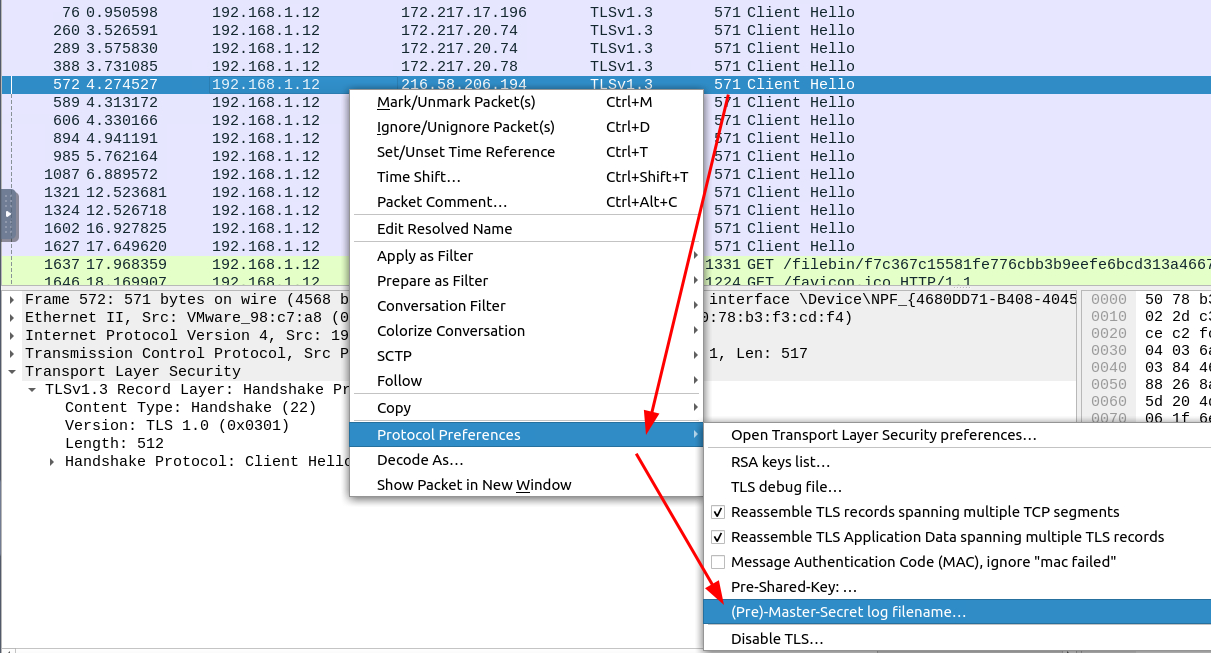
⬇️⬇️⬇️⬇️
Choosing the KeyLogFile:
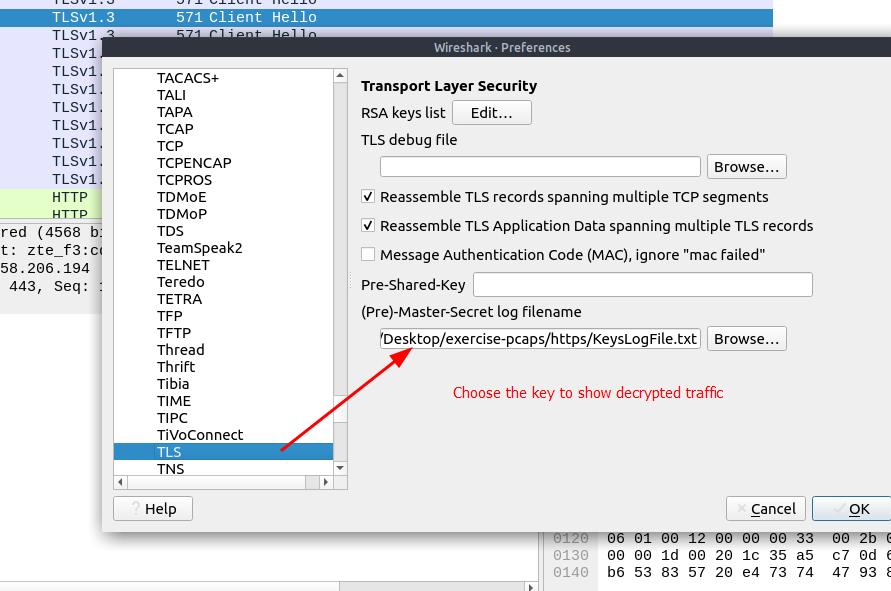
The above image shows that the traffic details are visible after using the key log file. Note that the packet details and bytes pane provides the data in different formats for investigation. Decompressed header info and HTTP2 packet details are available after decrypting the traffic. Depending on the packet details, you can also have the following data formats:
- Frame
- Decrypted TLS
- Decompressed Header
- Reassembled TCP
- Reassembled SSL
Detecting suspicious activities in chunked files is easy and a great way to learn how to focus on the details.
3. DNS
DNS analysis in a nutshell:
Similar to ICMP tunnels, DNS attacks are anomalies appearing/starting after a malware execution or vulnerability exploitation. Adversary creates (or already has) a domain address and configures it as a C2 channel. The malware or the commands executed after exploitation sends DNS queries to the C2 server. However, these queries are longer than default DNS queries and crafted for subdomain addresses. Unfortunately, these subdomain addresses are not actual addresses; they are encoded commands as shown below:
"encoded-commands.maliciousdomain.com"
When this query is routed to the C2 server, the server sends the actual malicious commands to the host. As the DNS queries are a natural part of the networking activity, these packets have the chance of not being detected by network perimeters. A security analyst should know how to investigate the DNS packet lengths and target addresses to spot these anomalies.
| Notes | Wireshark Filter |
|---|---|
| Global search | - dns |
| "DNS" options for grabbing the low-hanging fruits: - Query length. - Anomalous and non-regular names in DNS addresses. - Long DNS addresses with encoded subdomain addresses. - Known patterns like dnscat and dns2tcp. - Statistical analysis like the anomalous volume of DNS requests for a particular target. !mdns: Disable local link device queries. |
- dns contains "dnscat"- dns.q- dns.a shows IPs |
| Filter | Description |
dns |
Show all DNS packets |
dns.flags.response == 0 |
Show all DNS requests |
dns.flags.response == 1 |
Show all DNS responses |
dns.qry.type == 1 |
Show all DNS "A" records |